> ## Documentation Index
> Fetch the complete documentation index at: https://ppio.com/docs/llms.txt
> Use this file to discover all available pages before exploring further.
# 通过模板快速上手ComfyUI --- 以wan2.1_t2v为例
本文主要介绍如何基于现有工作流制作适配的 ComfyUI 模板
为了方便理解,本文以工作流为 wan2.1\_t2v.json 为例进行说明。
wan2.1\_t2v.json
```json theme={null}
{
"id": "8a815138-573d-48df-88b4-599fd7994cbb",
"revision": 0,
"last_node_id": 48,
"last_link_id": 95,
"nodes": [
{
"id": 37,
"type": "UNETLoader",
"pos": [
20,
-30
],
"size": [
346.7470703125,
82
],
"flags": {},
"order": 0,
"mode": 0,
"inputs": [],
"outputs": [
{
"name": "MODEL",
"type": "MODEL",
"slot_index": 0,
"links": [
94
]
}
],
"properties": {
"Node name for S&R": "UNETLoader",
"models": [
{
"name": "wan2.1_t2v_1.3B_fp16.safetensors",
"url": "https://huggingface.co/Comfy-Org/Wan_2.1_ComfyUI_repackaged/resolve/main/split_files/diffusion_models/wan2.1_t2v_1.3B_fp16.safetensors?download=true",
"directory": "diffusion_models"
}
]
},
"widgets_values": [
"wan2.1_t2v_1.3B_fp16.safetensors",
"default"
],
"color": "#322",
"bgcolor": "#533"
},
{
"id": 48,
"type": "ModelSamplingSD3",
"pos": [
440,
-30
],
"size": [
210,
58
],
"flags": {},
"order": 4,
"mode": 0,
"inputs": [
{
"name": "model",
"type": "MODEL",
"link": 94
}
],
"outputs": [
{
"name": "MODEL",
"type": "MODEL",
"slot_index": 0,
"links": [
95
]
}
],
"properties": {
"Node name for S&R": "ModelSamplingSD3"
},
"widgets_values": [
8
]
},
{
"id": 3,
"type": "KSampler",
"pos": [
870,
50
],
"size": [
315,
262
],
"flags": {},
"order": 7,
"mode": 0,
"inputs": [
{
"name": "model",
"type": "MODEL",
"link": 95
},
{
"name": "positive",
"type": "CONDITIONING",
"link": 46
},
{
"name": "negative",
"type": "CONDITIONING",
"link": 52
},
{
"name": "latent_image",
"type": "LATENT",
"link": 91
}
],
"outputs": [
{
"name": "LATENT",
"type": "LATENT",
"slot_index": 0,
"links": [
35
]
}
],
"properties": {
"Node name for S&R": "KSampler"
},
"widgets_values": [
839327983272663,
"randomize",
30,
6,
"uni_pc",
"simple",
1
]
},
{
"id": 38,
"type": "CLIPLoader",
"pos": [
20,
100
],
"size": [
330,
100
],
"flags": {},
"order": 1,
"mode": 0,
"inputs": [],
"outputs": [
{
"name": "CLIP",
"type": "CLIP",
"slot_index": 0,
"links": [
74,
75
]
}
],
"properties": {
"Node name for S&R": "CLIPLoader",
"models": [
{
"name": "umt5_xxl_fp8_e4m3fn_scaled.safetensors",
"url": "https://huggingface.co/Comfy-Org/Wan_2.1_ComfyUI_repackaged/resolve/main/split_files/text_encoders/umt5_xxl_fp8_e4m3fn_scaled.safetensors?download=true",
"directory": "text_encoders"
}
]
},
"widgets_values": [
"umt5_xxl_fp8_e4m3fn_scaled.safetensors",
"wan",
"default"
],
"color": "#322",
"bgcolor": "#533"
},
{
"id": 39,
"type": "VAELoader",
"pos": [
20,
250
],
"size": [
330,
60
],
"flags": {},
"order": 2,
"mode": 0,
"inputs": [],
"outputs": [
{
"name": "VAE",
"type": "VAE",
"slot_index": 0,
"links": [
76
]
}
],
"properties": {
"Node name for S&R": "VAELoader",
"models": [
{
"name": "wan_2.1_vae.safetensors",
"url": "https://huggingface.co/Comfy-Org/Wan_2.1_ComfyUI_repackaged/resolve/main/split_files/vae/wan_2.1_vae.safetensors?download=true",
"directory": "vae"
}
]
},
"widgets_values": [
"wan_2.1_vae.safetensors"
],
"color": "#322",
"bgcolor": "#533"
},
{
"id": 40,
"type": "EmptyHunyuanLatentVideo",
"pos": [
30,
390
],
"size": [
340,
130
],
"flags": {},
"order": 3,
"mode": 0,
"inputs": [],
"outputs": [
{
"name": "LATENT",
"type": "LATENT",
"slot_index": 0,
"links": [
91
]
}
],
"properties": {
"Node name for S&R": "EmptyHunyuanLatentVideo"
},
"widgets_values": [
832,
480,
33,
1
],
"color": "#322",
"bgcolor": "#533"
},
{
"id": 8,
"type": "VAEDecode",
"pos": [
870,
380
],
"size": [
210,
46
],
"flags": {},
"order": 8,
"mode": 0,
"inputs": [
{
"name": "samples",
"type": "LATENT",
"link": 35
},
{
"name": "vae",
"type": "VAE",
"link": 76
}
],
"outputs": [
{
"name": "IMAGE",
"type": "IMAGE",
"slot_index": 0,
"links": [
56,
93
]
}
],
"properties": {
"Node name for S&R": "VAEDecode"
},
"widgets_values": []
},
{
"id": 28,
"type": "SaveAnimatedWEBP",
"pos": [
1270,
50
],
"size": [
600,
460
],
"flags": {},
"order": 9,
"mode": 0,
"inputs": [
{
"name": "images",
"type": "IMAGE",
"link": 56
}
],
"outputs": [],
"properties": {},
"widgets_values": [
"ComfyUI",
16,
false,
90,
"default"
]
},
{
"id": 47,
"type": "SaveWEBM",
"pos": [
1280,
570
],
"size": [
330,
312.3846130371094
],
"flags": {
"collapsed": false
},
"order": 10,
"mode": 4,
"inputs": [
{
"name": "images",
"type": "IMAGE",
"link": 93
}
],
"outputs": [],
"properties": {
"Node name for S&R": "SaveWEBM",
"cnr_id": "comfy-core",
"ver": "0.3.26"
},
"widgets_values": [
"video/wan2.1",
"vp9",
24.000000000000004,
32
]
},
{
"id": 6,
"type": "CLIPTextEncode",
"pos": [
450,
90
],
"size": [
340,
120
],
"flags": {},
"order": 5,
"mode": 0,
"inputs": [
{
"name": "clip",
"type": "CLIP",
"link": 74
}
],
"outputs": [
{
"name": "CONDITIONING",
"type": "CONDITIONING",
"slot_index": 0,
"links": [
46
]
}
],
"title": "CLIP Text Encode (Positive Prompt)",
"properties": {
"Node name for S&R": "CLIPTextEncode"
},
"widgets_values": [
"a majestic old white-robed wizard casting a spell under a starlit sky, standing on an ancient stone altar in a ruined medieval forest temple, glowing magic symbols, celestial energy swirling around, long silver beard, ornate staff with glowing crystal, cinematic lighting, volumetric fog, fantasy atmosphere, ultra detailed, 4K, highly realistic, by greg rutkowski, artgerm, cinematic fantasy, animation of swirling energy, slow motion magical aura forming, glowing runes pulsing, cloak flowing in the wind"
],
"color": "#232",
"bgcolor": "#353"
},
{
"id": 7,
"type": "CLIPTextEncode",
"pos": [
460,
250
],
"size": [
340,
100
],
"flags": {},
"order": 6,
"mode": 0,
"inputs": [
{
"name": "clip",
"type": "CLIP",
"link": 75
}
],
"outputs": [
{
"name": "CONDITIONING",
"type": "CONDITIONING",
"slot_index": 0,
"links": [
52
]
}
],
"title": "CLIP Text Encode (Negative Prompt)",
"properties": {
"Node name for S&R": "CLIPTextEncode"
},
"widgets_values": [
"low quality, blurry, ugly, poorly drawn hands, deformed face, extra limbs, bad anatomy, low resolution, disfigured, unrealistic, cartoonish, watermark, text, signature, distorted proportions, creepy, glitch, jpeg artifacts\n"
],
"color": "#323",
"bgcolor": "#535"
}
],
"links": [
[
35,
3,
0,
8,
0,
"LATENT"
],
[
46,
6,
0,
3,
1,
"CONDITIONING"
],
[
52,
7,
0,
3,
2,
"CONDITIONING"
],
[
56,
8,
0,
28,
0,
"IMAGE"
],
[
74,
38,
0,
6,
0,
"CLIP"
],
[
75,
38,
0,
7,
0,
"CLIP"
],
[
76,
39,
0,
8,
1,
"VAE"
],
[
91,
40,
0,
3,
3,
"LATENT"
],
[
93,
8,
0,
47,
0,
"IMAGE"
],
[
94,
37,
0,
48,
0,
"MODEL"
],
[
95,
48,
0,
3,
0,
"MODEL"
]
],
"groups": [
{
"id": 1,
"title": "Load models",
"bounding": [
10,
-100,
360,
430
],
"color": "#3f789e",
"font_size": 24,
"flags": {}
}
],
"config": {},
"extra": {
"ds": {
"scale": 0.839054528882439,
"offset": [
173.82027100712344,
171.24661681774091
]
},
"node_versions": {
"comfy-core": "0.3.27"
}
},
"version": 0.4
}
```
需要制作一个满足 wan2.1\_t2v.json 工作流的 Dockerfile
### 模型下载
在开始构建镜像之前,需要提前准备好模板运行所需的模型文件。
不同工作流依赖的模型不同,这一步以你使用的工作流需求为准。
你需要确认以下内容:
* 这个模板依赖哪些模型
* 每个模型应该放在哪个目录
* 模型文件名是否需要和工作流中的引用保持一致
已知该 **comfyui:wan2.1-t2v-14b** 的官方提供的工作流需要下载三个模型
将需要的模型分别下载到该模型所需要的目录里
模型可以在 [hugging face 官网](https://huggingface.co/) 下载
首先在浏览器搜索需要下载的模型,选择 hugging face 官网的链接
确认模型名称,再点击 Copy download link
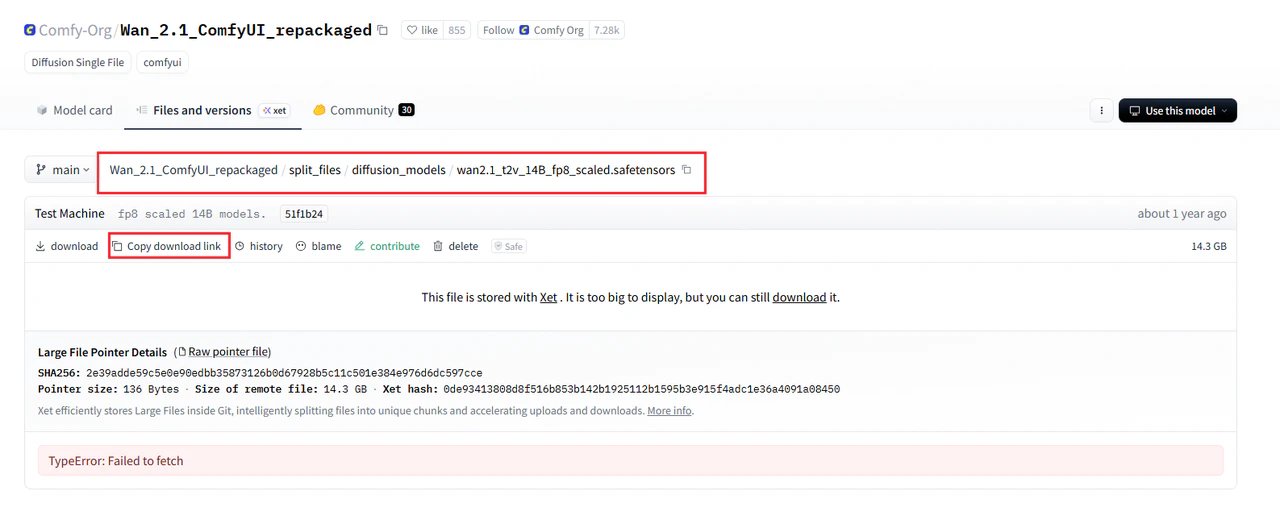 标蓝区域为下载后的模型名称,标绿区域为模型的下载链接。
Dockerfile 片段
```dockerfile theme={null}
RUN cd /root/ComfyUI/models/diffusion_models && \
curl -L -o wan2.1_t2v_14B_fp8_scaled.safetensors https://huggingface.co/Comfy-Org/Wan_2.1_ComfyUI_repackaged/resolve/main/split_files/diffusion_models/wan2.1_t2v_14B_fp8_scaled.safetensors
```
umt5\_xxl\_fp8\_e4m3fn\_scaled.safetensors 和 wan\_2.1\_vae.safetensors 同理
结果如下
Dockerfile 片段
```dockerfile theme={null}
RUN cd /root/ComfyUI/models/diffusion_models && \
curl -L -o wan2.1_t2v_14B_fp8_scaled.safetensors https://huggingface.co/Comfy-Org/Wan_2.1_ComfyUI_repackaged/resolve/main/split_files/diffusion_models/wan2.1_t2v_14B_fp8_scaled.safetensors
RUN cd /root/ComfyUI/models/text_encoders && \
curl -L -o umt5_xxl_fp8_e4m3fn_scaled.safetensors https://huggingface.co/Comfy-Org/Wan_2.1_ComfyUI_repackaged/resolve/main/split_files/text_encoders/umt5_xxl_fp8_e4m3fn_scaled.safetensors
RUN cd /root/ComfyUI/models/vae && \
curl -L -o wan_2.1_vae.safetensors https://huggingface.co/Comfy-Org/Wan_2.1_ComfyUI_repackaged/resolve/main/split_files/vae/wan_2.1_vae.safetensors
```
三个模型的 huggingface 地址
[wan2.1\_t2v\_14B\_fp8\_scaled.safetensors](https://huggingface.co/Comfy-Org/Wan_2.1_ComfyUI_repackaged/blob/main/split_files/diffusion_models/wan2.1_t2v_14B_fp8_scaled.safetensors)
[umt5\_xxl\_fp8\_e4m3fn\_scaled.safetensors](https://huggingface.co/f5aiteam/CLIP/blob/main/umt5_xxl_fp8_e4m3fn_scaled.safetensors)
[wan\_2.1\_vae.safetensors](https://huggingface.co/Comfy-Org/Wan_2.1_ComfyUI_repackaged/tree/main/split_files/vae)
节点下载同理,即 把节点下载到所需要的目录中
节点可以去 [github 官网](https://github.com/) 下载
### 工作流的替换
复制工作流到 Dockerfile 里
Dockerfile 片段
```dockerfile theme={null}
#Copy wan2.1-t2v-14b default workflow
COPY wan2.1_t2v.json /root/ComfyUI/user/default/workflows/wan2.1_t2v.json
```
## 制作 Dockerfile
Dockerfile 用于定义运行环境、依赖安装方式以及 ComfyUI 初始化内容,后续构建镜像时会直接使用它。
本文推荐以 pytorch/pytorch:2.7.1-cuda12.8-cudnn9-runtime 为基础镜像进行操作。
**以下为 comfyui:wan2.1-t2v-14b 的 Dockefile**
标蓝区域为下载后的模型名称,标绿区域为模型的下载链接。
Dockerfile 片段
```dockerfile theme={null}
RUN cd /root/ComfyUI/models/diffusion_models && \
curl -L -o wan2.1_t2v_14B_fp8_scaled.safetensors https://huggingface.co/Comfy-Org/Wan_2.1_ComfyUI_repackaged/resolve/main/split_files/diffusion_models/wan2.1_t2v_14B_fp8_scaled.safetensors
```
umt5\_xxl\_fp8\_e4m3fn\_scaled.safetensors 和 wan\_2.1\_vae.safetensors 同理
结果如下
Dockerfile 片段
```dockerfile theme={null}
RUN cd /root/ComfyUI/models/diffusion_models && \
curl -L -o wan2.1_t2v_14B_fp8_scaled.safetensors https://huggingface.co/Comfy-Org/Wan_2.1_ComfyUI_repackaged/resolve/main/split_files/diffusion_models/wan2.1_t2v_14B_fp8_scaled.safetensors
RUN cd /root/ComfyUI/models/text_encoders && \
curl -L -o umt5_xxl_fp8_e4m3fn_scaled.safetensors https://huggingface.co/Comfy-Org/Wan_2.1_ComfyUI_repackaged/resolve/main/split_files/text_encoders/umt5_xxl_fp8_e4m3fn_scaled.safetensors
RUN cd /root/ComfyUI/models/vae && \
curl -L -o wan_2.1_vae.safetensors https://huggingface.co/Comfy-Org/Wan_2.1_ComfyUI_repackaged/resolve/main/split_files/vae/wan_2.1_vae.safetensors
```
三个模型的 huggingface 地址
[wan2.1\_t2v\_14B\_fp8\_scaled.safetensors](https://huggingface.co/Comfy-Org/Wan_2.1_ComfyUI_repackaged/blob/main/split_files/diffusion_models/wan2.1_t2v_14B_fp8_scaled.safetensors)
[umt5\_xxl\_fp8\_e4m3fn\_scaled.safetensors](https://huggingface.co/f5aiteam/CLIP/blob/main/umt5_xxl_fp8_e4m3fn_scaled.safetensors)
[wan\_2.1\_vae.safetensors](https://huggingface.co/Comfy-Org/Wan_2.1_ComfyUI_repackaged/tree/main/split_files/vae)
节点下载同理,即 把节点下载到所需要的目录中
节点可以去 [github 官网](https://github.com/) 下载
### 工作流的替换
复制工作流到 Dockerfile 里
Dockerfile 片段
```dockerfile theme={null}
#Copy wan2.1-t2v-14b default workflow
COPY wan2.1_t2v.json /root/ComfyUI/user/default/workflows/wan2.1_t2v.json
```
## 制作 Dockerfile
Dockerfile 用于定义运行环境、依赖安装方式以及 ComfyUI 初始化内容,后续构建镜像时会直接使用它。
本文推荐以 pytorch/pytorch:2.7.1-cuda12.8-cudnn9-runtime 为基础镜像进行操作。
**以下为 comfyui:wan2.1-t2v-14b 的 Dockefile**
```bash theme={null}
FROM pytorch/pytorch:2.7.1-cuda12.8-cudnn9-runtime
ENV DEBIAN_FRONTEND=noninteractive
ENV PYTHONUNBUFFERED=1
# install system packages
RUN apt update -y && apt install -y \
python3 python-is-python3 python3-pip \
libgl1-mesa-glx \
ffmpeg \
curl \
libglib2.0-0 \
git aria2 && \
apt clean
# install python packages
RUN pip install \
diffusers \
opencv-python
RUN cd /root && git clone https://github.com/comfyanonymous/ComfyUI && \
cd ComfyUI && pip install -r requirements.txt
WORKDIR /root/ComfyUI
#Download comfyui-manager
RUN cd custom_nodes && git clone https://github.com/ltdrdata/ComfyUI-Manager comfyui-manager
RUN cd /root/ComfyUI/models/diffusion_models && \
curl -L -o wan2.1_t2v_14B_fp8_scaled.safetensors https://huggingface.co/Comfy-Org/Wan_2.1_ComfyUI_repackaged/resolve/main/split_files/diffusion_models/wan2.1_t2v_14B_fp8_scaled.safetensors
RUN cd /root/ComfyUI/models/text_encoders && \
curl -L -o umt5_xxl_fp8_e4m3fn_scaled.safetensors https://huggingface.co/Comfy-Org/Wan_2.1_ComfyUI_repackaged/resolve/main/split_files/text_encoders/umt5_xxl_fp8_e4m3fn_scaled.safetensors
RUN cd /root/ComfyUI/models/vae && \
curl -L -o wan_2.1_vae.safetensors https://huggingface.co/Comfy-Org/Wan_2.1_ComfyUI_repackaged/resolve/main/split_files/vae/wan_2.1_vae.safetensors
#Copy wan2.1-t2v-14b default workflow
COPY wan2.1_t2v.json /root/ComfyUI/user/default/workflows/wan2.1_t2v.json
CMD ["/bin/bash", "-c", "cd /root/ComfyUI && python3 main.py --listen 0.0.0.0"]
```
可以将以上当作模板,通过修改替换为你所需要下载的节点和模型,来适配你所需的工作流。
如果后面要安装自定义节点、下载模型或复制工作流文件,也通常会继续补在这个 Dockerfile 里
`#Download comfyui-manager` 之上的内容无需修改,为 ComfyUI 环境配置,我们只需要完成修改节点和模型的下载来适配所需工作流,以及工作流的替换。
### 检查文件位置
```go theme={null}
.
├── Dockerfile
└── wan2.1_t2v.json
```
你需要重点确认以下内容:
* Dockerfile 在正确位置
* 工作流文件在正确位置
* 模型文件在正确位置,模型名称完全正确
* 如果有自定义节点或额外脚本,也放在正确位置
#### 预期结果
完成后,你应当已经确认模板制作涉及的关键文件都放在了预期目录中
这本质上是把前面准备好的环境和文件打包成一个可部署的镜像。
接下来就可以将 Dockefile 打成镜像推送到镜像仓库了。
## 镜像的构建和推送
在制作完 Dockerfile 之后
需要进行镜像构建,并将其推送到目标镜像仓库,供后续平台创建模板时使用。
### 获取镜像仓库凭证
在镜像构建和推送之前,需要获取镜像仓库凭证
首先在 PPIO 官网的安全凭证管理处复制镜像上传凭证
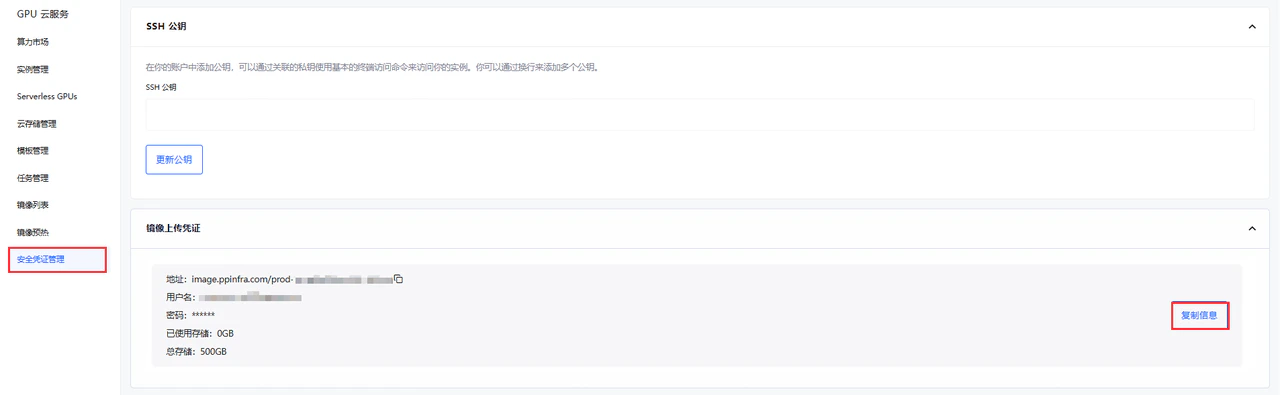 完成认证
```bash theme={null}
docker login image.ppinfra.com --username="你的username" --password="你的password"
WARNING! Using --password via the CLI is insecure. Use --password-stdin.
WARNING! Your credentials are stored unencrypted in '/root/.docker/config.json'.
Configure a credential helper to remove this warning. See
https://docs.docker.com/go/credential-store/
```
构建镜像时,确认当前目录下是 Dockerfile 文件
这里我以 PPIO 内部官方仓库地址做演示
```text theme={null}
image.ppinfra.com/prod-gpucloudpublic/
```
你需要使用你自己的认证仓库地址
完成认证
```bash theme={null}
docker login image.ppinfra.com --username="你的username" --password="你的password"
WARNING! Using --password via the CLI is insecure. Use --password-stdin.
WARNING! Your credentials are stored unencrypted in '/root/.docker/config.json'.
Configure a credential helper to remove this warning. See
https://docs.docker.com/go/credential-store/
```
构建镜像时,确认当前目录下是 Dockerfile 文件
这里我以 PPIO 内部官方仓库地址做演示
```text theme={null}
image.ppinfra.com/prod-gpucloudpublic/
```
你需要使用你自己的认证仓库地址
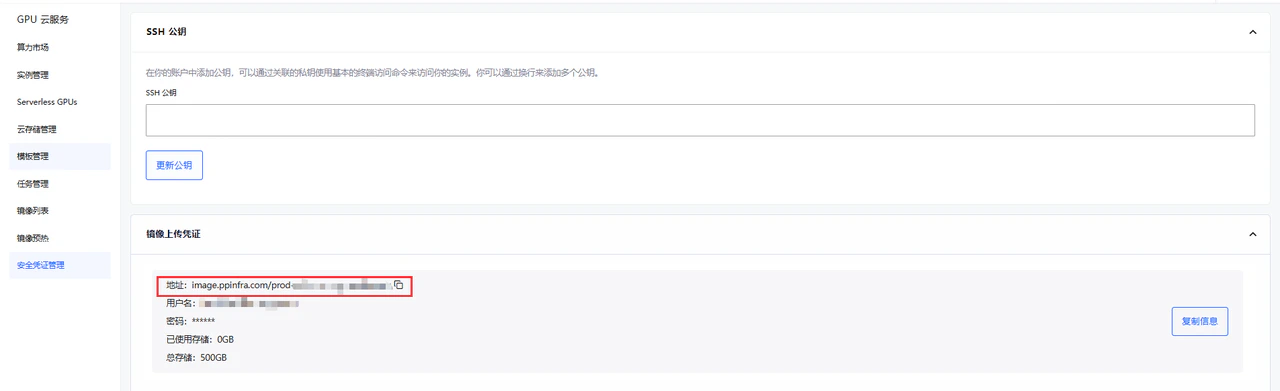 比如这里是
```shell theme={null}
image.ppinfra.com/prod-zirllhuyllegrjroryqb/
```
示例
```text theme={null}
image.ppinfra.com/prod-zirllhuyllegrjroryqb/comfyui:wan2.1-t2v-14v-test
```
### 构建镜像
```bash theme={null}
docker build -t image.ppinfra.com/prod-gpucloudpublic/comfyui:wan2.1-t2v-14v-test .
```
比如这里是
```shell theme={null}
image.ppinfra.com/prod-zirllhuyllegrjroryqb/
```
示例
```text theme={null}
image.ppinfra.com/prod-zirllhuyllegrjroryqb/comfyui:wan2.1-t2v-14v-test
```
### 构建镜像
```bash theme={null}
docker build -t image.ppinfra.com/prod-gpucloudpublic/comfyui:wan2.1-t2v-14v-test .
```
```bash theme={null}
docker build -t image.ppinfra.com/prod-gpucloudpublic/comfyui:wan2.1-t2v-14v-test .
[+] Building 1.3s (16/16) FINISHED docker:default
=> [internal] load build definition from dockerfile 0.0s
=> => transferring dockerfile: 1.60kB 0.0s
=> [internal] load metadata for docker.io/pytorch/pytorch:2.7.1-cuda12.8-cudnn9-runtime 1.3s
=> [auth] pytorch/pytorch:pull token for registry-1.docker.io 0.0s
=> [internal] load .dockerignore 0.0s
=> => transferring context: 2B 0.0s
=> [internal] load build context 0.0s
=> => transferring context: 37B 0.0s
=> [ 1/10] FROM docker.io/pytorch/pytorch:2.7.1-cuda12.8-cudnn9-runtime@sha256:c16f4c749e2d9e96878875cdf6cc45cddda1d1a36fddd371dd6f2360f1b6e2a2 0.0s
=> CACHED [ 2/10] RUN apt update -y && apt install -y python3 python-is-python3 python3-pip libgl1-mesa-glx ffmpeg curl libglib2.0-0 git aria2 && apt clean 0.0s
=> CACHED [ 3/10] RUN pip install diffusers opencv-python 0.0s
=> CACHED [ 4/10] RUN cd /root && git clone https://github.com/comfyanonymous/ComfyUI && cd ComfyUI && pip install -r requirements.txt 0.0s
=> CACHED [ 5/10] WORKDIR /root/ComfyUI 0.0s
=> CACHED [ 6/10] RUN cd custom_nodes && git clone https://github.com/ltdrdata/ComfyUI-Manager comfyui-manager 0.0s
=> CACHED [ 7/10] RUN cd /root/ComfyUI/models/diffusion_models && curl -L -o wan2.1_t2v_14B_fp8_scaled.safetensors https://huggingface.co/Comfy-Org/Wan_2.1_ComfyUI_repackaged/resolve/main/split_files/diffusi 0.0s
=> CACHED [ 8/10] RUN cd /root/ComfyUI/models/text_encoders && curl -L -o umt5_xxl_fp8_e4m3fn_scaled.safetensors https://huggingface.co/Comfy-Org/Wan_2.1_ComfyUI_repackaged/resolve/main/split_files/text_enco 0.0s
=> CACHED [ 9/10] RUN cd /root/ComfyUI/models/vae && curl -L -o wan_2.1_vae.safetensors https://huggingface.co/Comfy-Org/Wan_2.1_ComfyUI_repackaged/resolve/main/split_files/vae/wan_2.1_vae.safetensors 0.0s
=> CACHED [10/10] COPY wan2.1_t2v.json /root/ComfyUI/user/default/workflows/wan2.1_t2v.json 0.0s
=> exporting to image 0.0s
=> => exporting layers 0.0s
=> => writing image sha256:4df410a289e838464aef108a279c052cfd9db77e556c6ee044dfb9970d7c49cc 0.0s
=> => naming to image.ppinfra.com/prod-gpucloudpublic/comfyui:wan2.1-t2v-14v-test
```
### 推送镜像
```bash theme={null}
docker push image.ppinfra.com/prod-gpucloudpublic/comfyui:wan2.1-t2v-14v-test
```
```yaml theme={null}
docker push image.ppinfra.com/prod-gpucloudpublic/comfyui:wan2.1-t2v-14v-test
The push refers to repository [image.ppinfra.com/prod-gpucloudpublic/comfyui]
02c0cebd2181: Pushed
3da69cbe286a: Pushed
b430801dea2e: Pushed
6daa0b6e53ca: Pushed
32ba4a599da5: Pushed
5f70bf18a086: Layer already exists
8881a2774363: Pushed
b17ac8104109: Pushed
9169cd407ef5: Pushed
1fda46049be1: Layer already exists
2bf9ca7c9c37: Layer already exists
105c4058ec6f: Layer already exists
f862e1968e4b: Layer already exists
wan2.1-t2v-14v-test: digest: sha256:6bd8b53186a79650a0105904fe6008e4c25bdcbbd959123956cdabe48770396d size: 3274
```
镜像推送到仓库后,去 PPIO 官网创建模板
## 创建模板
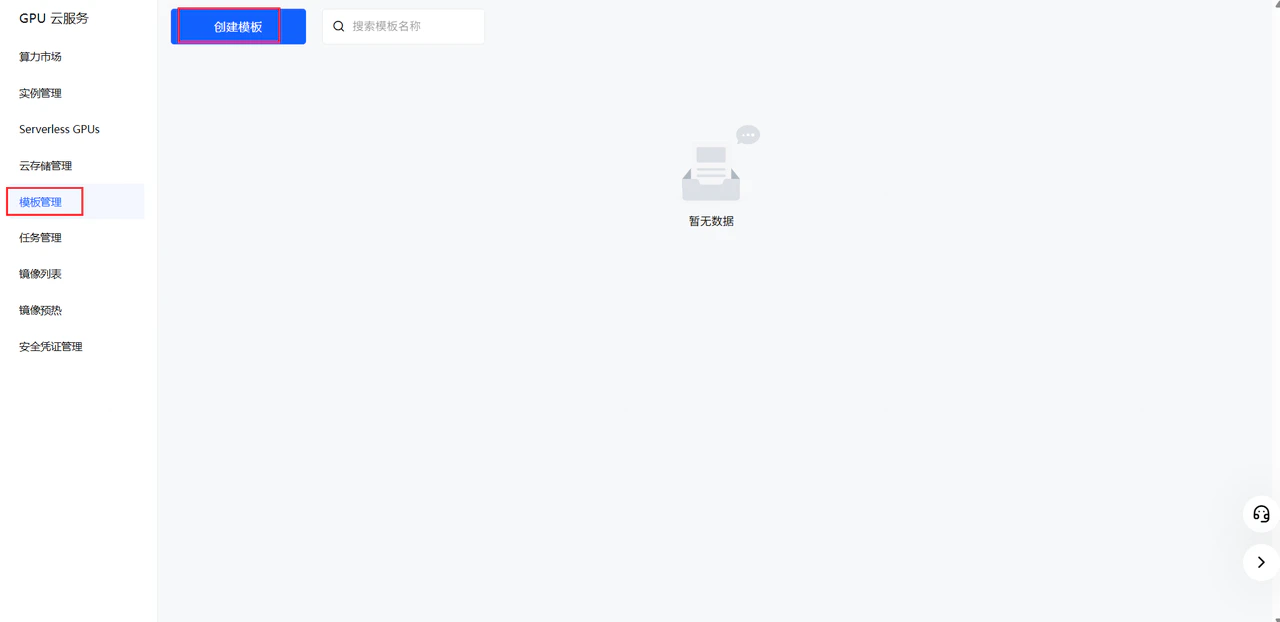
在 [PPIO 控制台](https://ppio.com/gpu-instance/console/templates) 创建新模板
点击创建模板
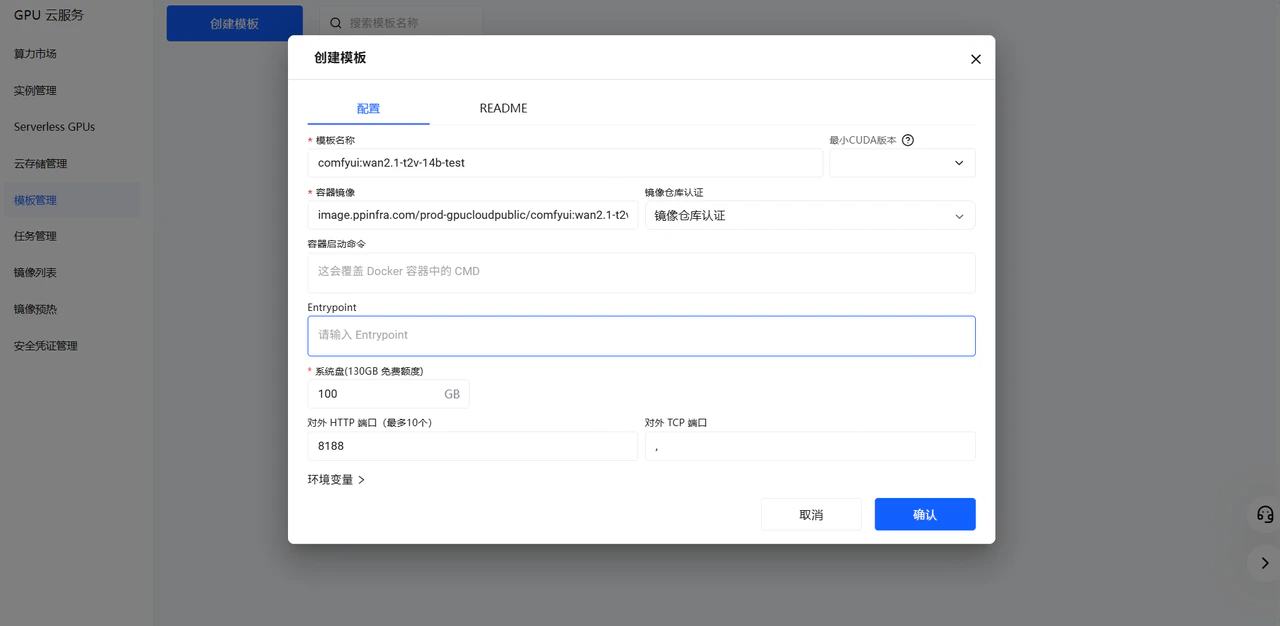
 配置好对应模板参数点击确认
容器镜像填写你推送的镜像地址
配置好对应模板参数点击确认
容器镜像填写你推送的镜像地址
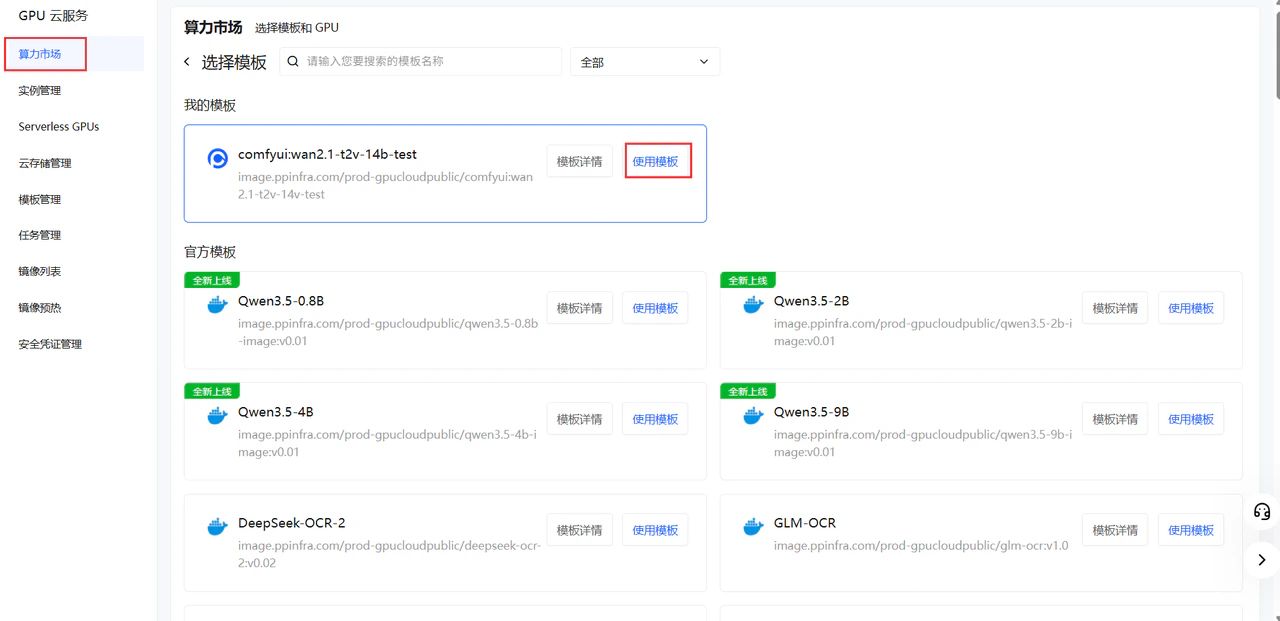
 在算力市场找到创建的模板
 按照需求选择卡型
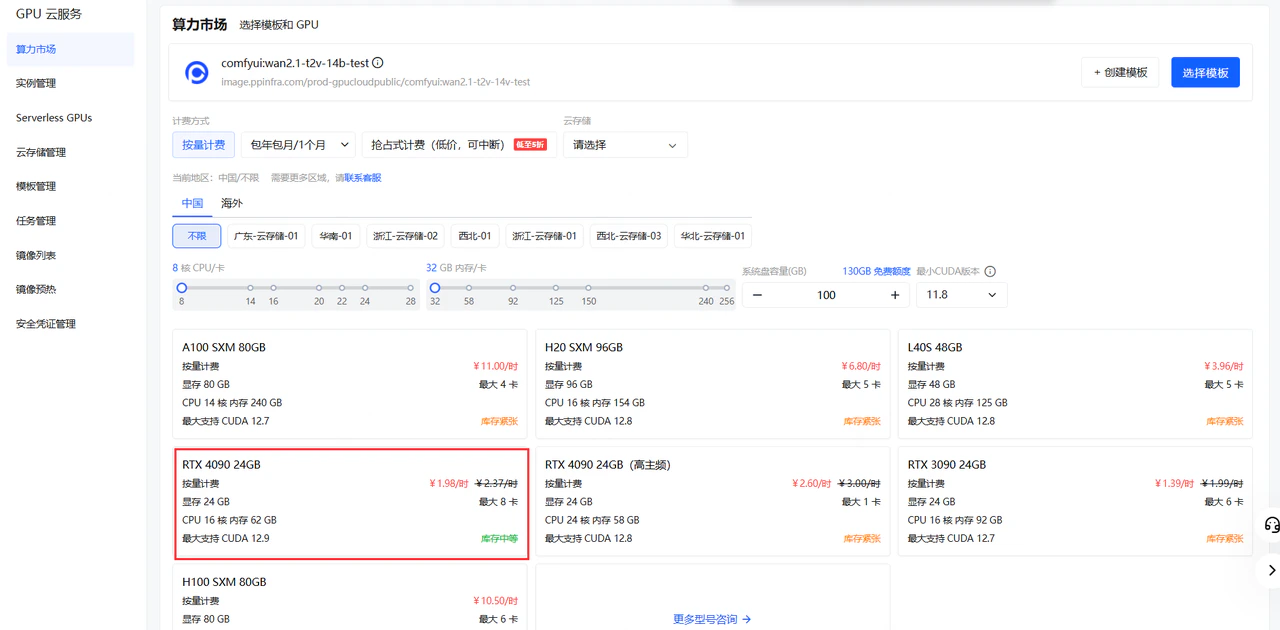 确认参数点击部署
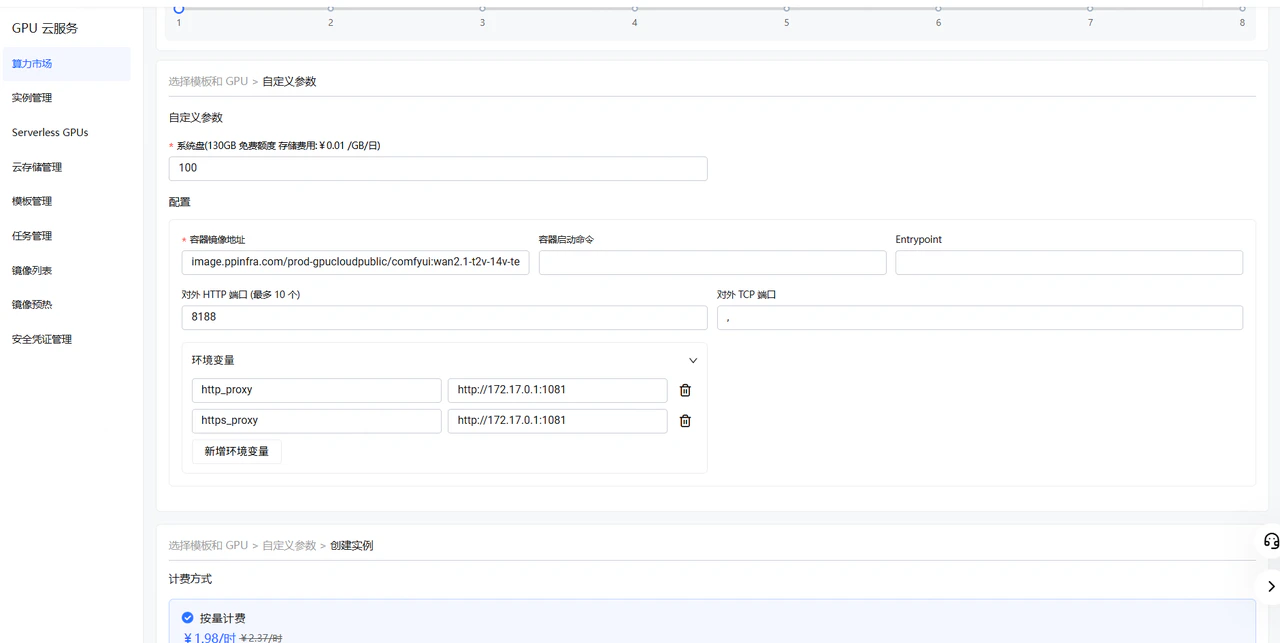
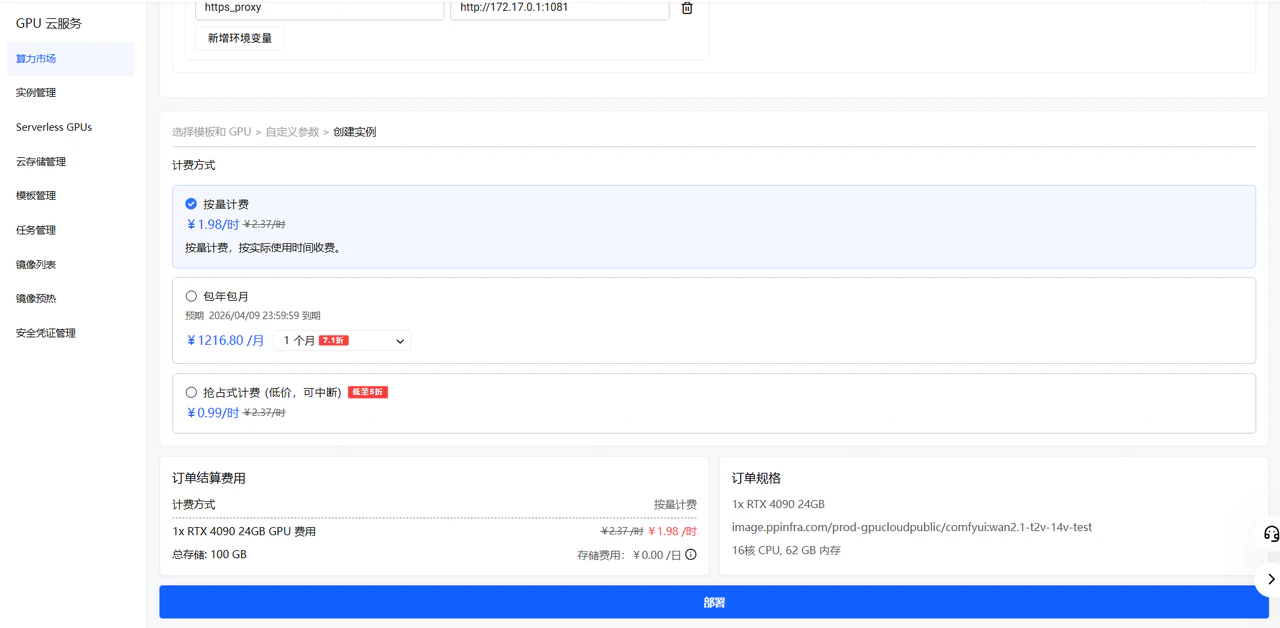 等待实例运行,并查看实例日志,确保服务正常启动。
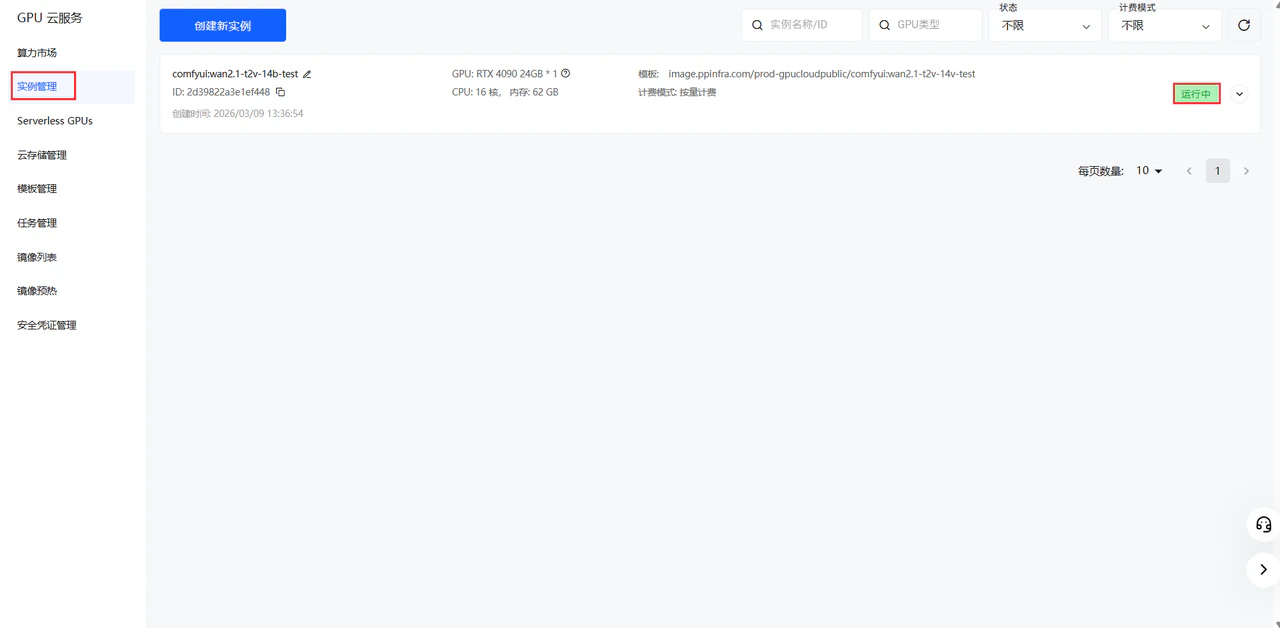
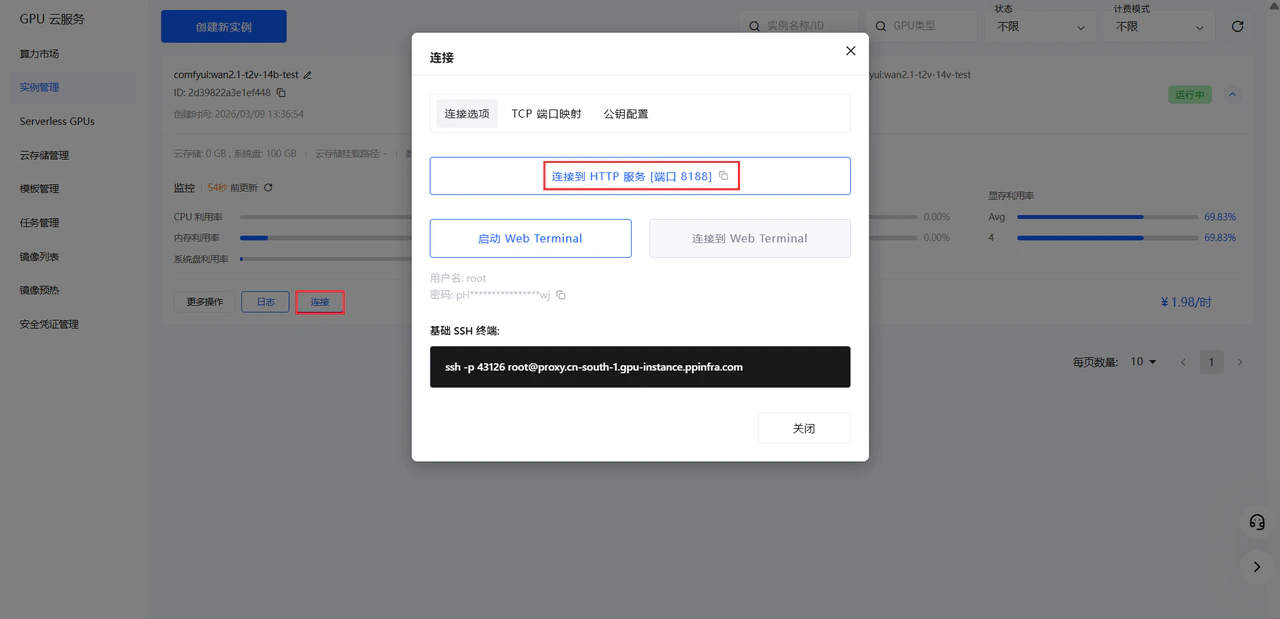
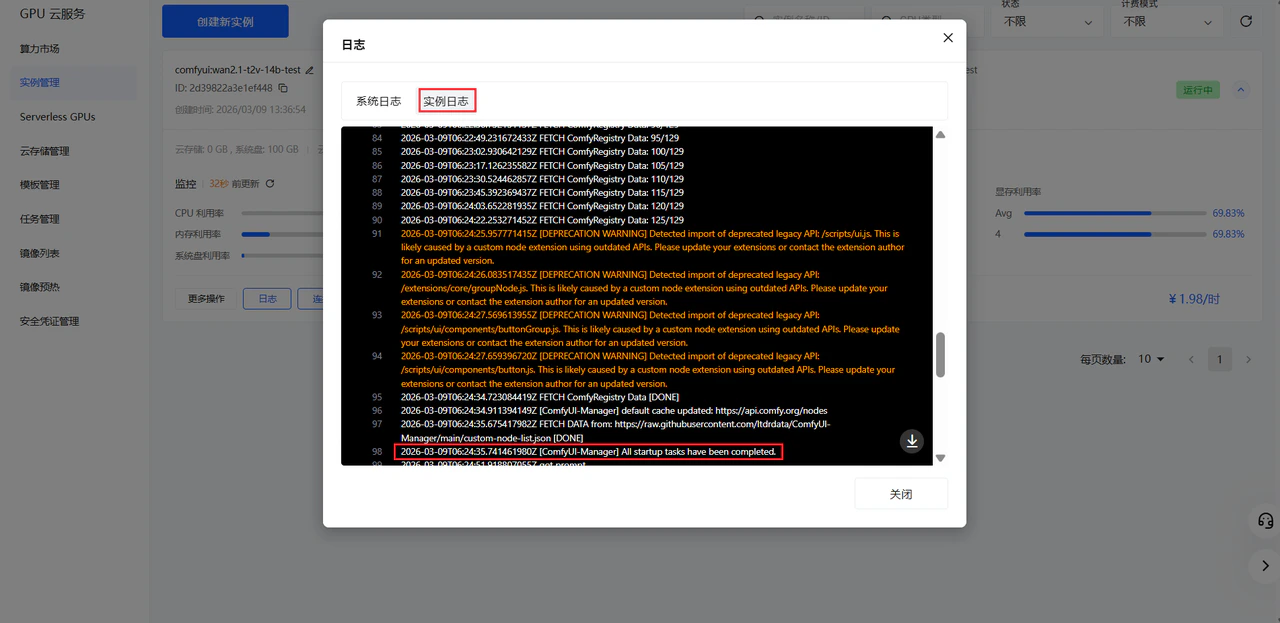 点击 连接到 HTTP 服务 进入 ComfyUI 网页
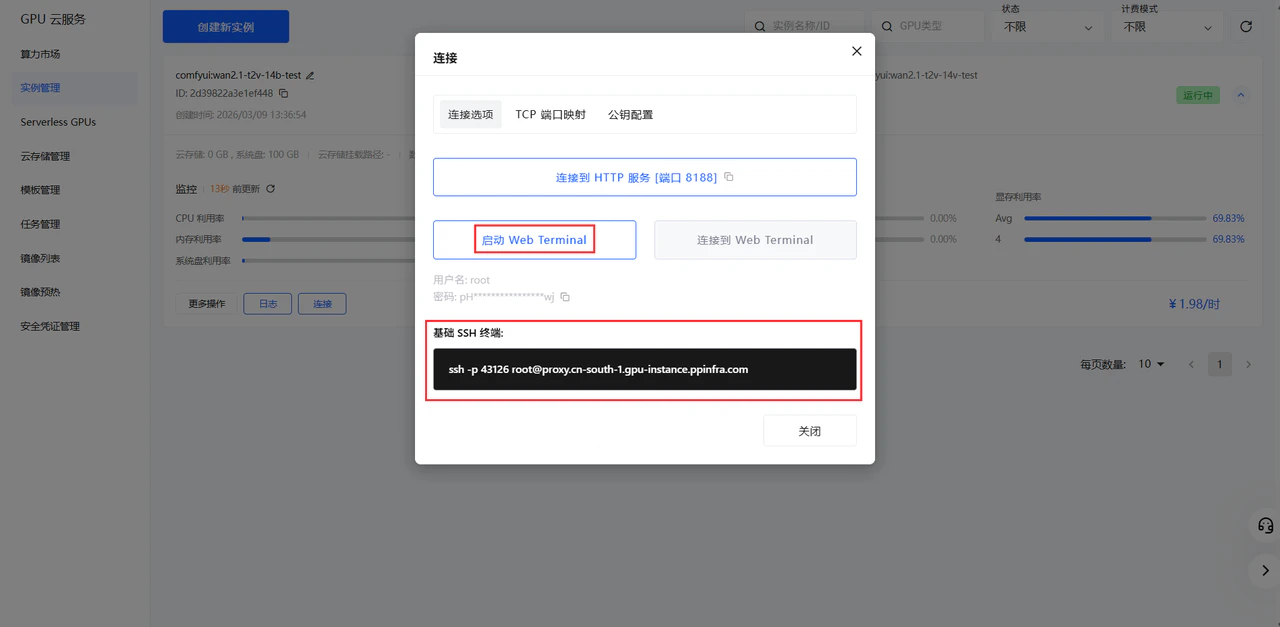
 点击 启动 Web Terminal 选项,启动后点击连接选项即可连接到网页终端,也支持 SSH 连接到终端。
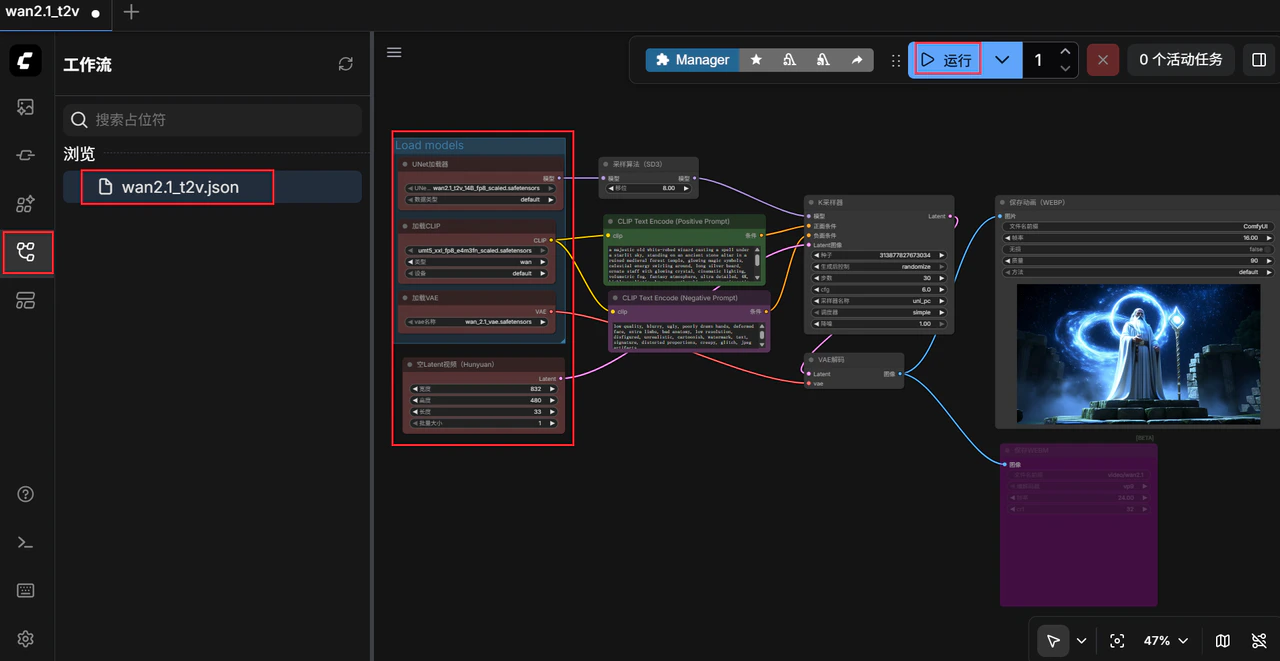
 进入 ComfyUI 页面后,选择工作流,以及工作流所需模型,点击运行。
 ## API调用
首先导出工作流的 api json 文件
1. 在 ComfyUI 界面点击顶部菜单栏的**工作流** (Workflow)
2. 选择**导出(API)** (Export API)
3. 浏览器会自动下载一个 JSON 文件,这里是 wan2.1\_t2v.json
## API调用
首先导出工作流的 api json 文件
1. 在 ComfyUI 界面点击顶部菜单栏的**工作流** (Workflow)
2. 选择**导出(API)** (Export API)
3. 浏览器会自动下载一个 JSON 文件,这里是 wan2.1\_t2v.json
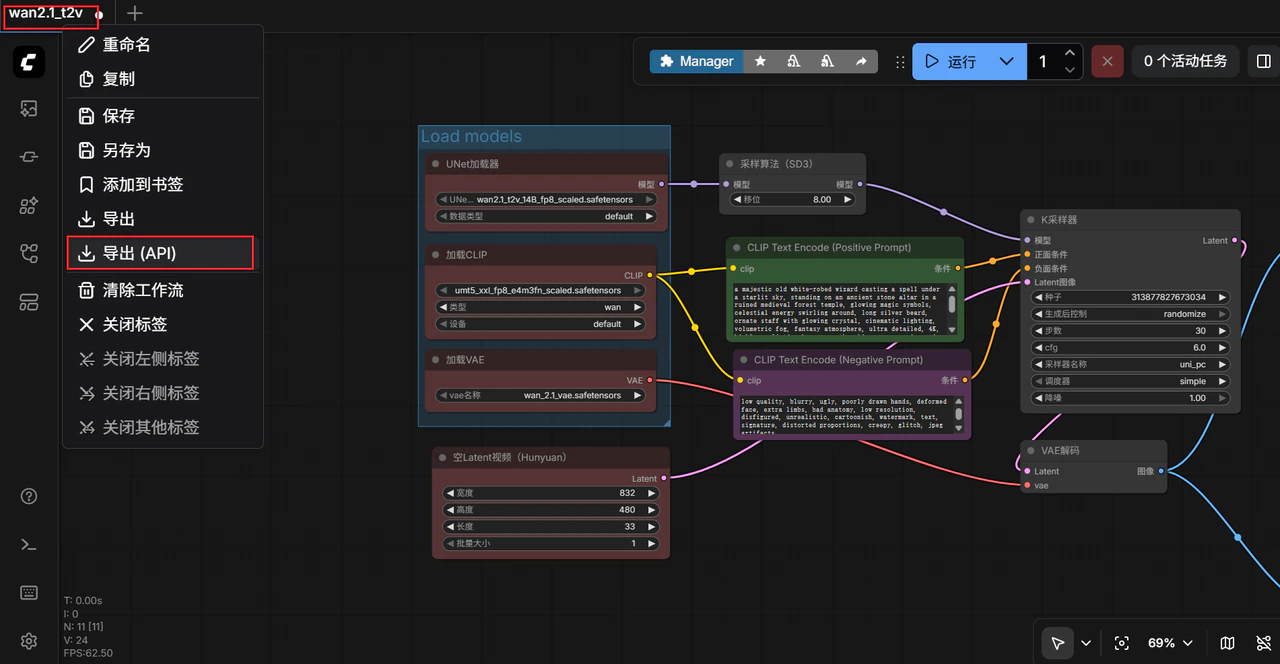 wan2.1\_t2v.json(api)
```json theme={null}
{
"3": {
"inputs": {
"seed": 313877827673034,
"steps": 30,
"cfg": 6,
"sampler_name": "uni_pc",
"scheduler": "simple",
"denoise": 1,
"model": [
"48",
0
],
"positive": [
"6",
0
],
"negative": [
"7",
0
],
"latent_image": [
"40",
0
]
},
"class_type": "KSampler",
"_meta": {
"title": "K采样器"
}
},
"6": {
"inputs": {
"text": "a majestic old white-robed wizard casting a spell under a starlit sky, standing on an ancient stone altar in a ruined medieval forest temple, glowing magic symbols, celestial energy swirling around, long silver beard, ornate staff with glowing crystal, cinematic lighting, volumetric fog, fantasy atmosphere, ultra detailed, 4K, highly realistic, by greg rutkowski, artgerm, cinematic fantasy, animation of swirling energy, slow motion magical aura forming, glowing runes pulsing, cloak flowing in the wind",
"clip": [
"38",
0
]
},
"class_type": "CLIPTextEncode",
"_meta": {
"title": "CLIP Text Encode (Positive Prompt)"
}
},
"7": {
"inputs": {
"text": "low quality, blurry, ugly, poorly drawn hands, deformed face, extra limbs, bad anatomy, low resolution, disfigured, unrealistic, cartoonish, watermark, text, signature, distorted proportions, creepy, glitch, jpeg artifacts\n",
"clip": [
"38",
0
]
},
"class_type": "CLIPTextEncode",
"_meta": {
"title": "CLIP Text Encode (Negative Prompt)"
}
},
"8": {
"inputs": {
"samples": [
"3",
0
],
"vae": [
"39",
0
]
},
"class_type": "VAEDecode",
"_meta": {
"title": "VAE解码"
}
},
"28": {
"inputs": {
"filename_prefix": "ComfyUI",
"fps": 16,
"lossless": false,
"quality": 90,
"method": "default",
"images": [
"8",
0
]
},
"class_type": "SaveAnimatedWEBP",
"_meta": {
"title": "保存动画(WEBP)"
}
},
"37": {
"inputs": {
"unet_name": "wan2.1_t2v_14B_fp8_scaled.safetensors",
"weight_dtype": "default"
},
"class_type": "UNETLoader",
"_meta": {
"title": "UNet加载器"
}
},
"38": {
"inputs": {
"clip_name": "umt5_xxl_fp8_e4m3fn_scaled.safetensors",
"type": "wan",
"device": "default"
},
"class_type": "CLIPLoader",
"_meta": {
"title": "加载CLIP"
}
},
"39": {
"inputs": {
"vae_name": "wan_2.1_vae.safetensors"
},
"class_type": "VAELoader",
"_meta": {
"title": "加载VAE"
}
},
"40": {
"inputs": {
"width": 832,
"height": 480,
"length": 33,
"batch_size": 1
},
"class_type": "EmptyHunyuanLatentVideo",
"_meta": {
"title": "空Latent视频(Hunyuan)"
}
},
"48": {
"inputs": {
"shift": 8,
"model": [
"37",
0
]
},
"class_type": "ModelSamplingSD3",
"_meta": {
"title": "采样算法(SD3)"
}
}
}
```
test.py
```python theme={null}
import argparse
import json
import os
import time
import uuid
from urllib.parse import urlencode
import requests
def load_prompt(path: str) -> dict:
with open(path, "r", encoding="utf-8") as f:
return json.load(f)
def patch_prompt(prompt: dict,
positive=None, negative=None,
seed=None, steps=None, cfg=None,
width=None, height=None, length=None, fps=None):
# 6/7: prompt
if positive is not None:
prompt["6"]["inputs"]["text"] = positive
if negative is not None:
prompt["7"]["inputs"]["text"] = negative
# 3: KSampler
if seed is not None:
prompt["3"]["inputs"]["seed"] = int(seed)
if steps is not None:
prompt["3"]["inputs"]["steps"] = int(steps)
if cfg is not None:
prompt["3"]["inputs"]["cfg"] = float(cfg)
# 40: video latent
if width is not None:
prompt["40"]["inputs"]["width"] = int(width)
if height is not None:
prompt["40"]["inputs"]["height"] = int(height)
if length is not None:
prompt["40"]["inputs"]["length"] = int(length)
# 28: SaveAnimatedWEBP
if fps is not None:
prompt["28"]["inputs"]["fps"] = int(fps)
return prompt
def post_prompt(base_url: str, prompt: dict, client_id: str) -> dict:
payload = {"client_id": client_id, "prompt": prompt}
r = requests.post(f"{base_url}/prompt", json=payload, timeout=60)
r.raise_for_status()
return r.json()
def get_history(base_url: str, prompt_id: str) -> dict:
r = requests.get(f"{base_url}/history/{prompt_id}", timeout=60)
r.raise_for_status()
return r.json()
def wait_done(base_url: str, prompt_id: str, interval=2, timeout=3600) -> dict:
start = time.time()
while True:
if time.time() - start > timeout:
raise TimeoutError(f"Timeout waiting prompt_id={prompt_id}")
hist = get_history(base_url, prompt_id)
if prompt_id in hist:
return hist[prompt_id]
time.sleep(interval)
def extract_files(history_item: dict):
"""
history_item["outputs"] 示例(你的 SaveAnimatedWEBP 通常在 node 28 下):
{
"outputs": {
"28": { "animated": [ {filename, subfolder, type}, ...] }
}
}
"""
outputs = history_item.get("outputs", {})
files = []
for node_id, node_out in outputs.items():
if not isinstance(node_out, dict):
continue
for slot, v in node_out.items():
if isinstance(v, list):
for item in v:
if isinstance(item, dict) and item.get("filename"):
files.append({
"node_id": node_id,
"slot": slot,
"filename": item["filename"],
"subfolder": item.get("subfolder", ""),
"type": item.get("type", "output"),
})
return files
def view_url(base_url: str, f: dict) -> str:
q = urlencode({
"filename": f["filename"],
"subfolder": f.get("subfolder", ""),
"type": f.get("type", "output")
})
return f"{base_url}/view?{q}"
def download(base_url: str, f: dict, out_dir: str) -> str:
os.makedirs(out_dir, exist_ok=True)
url = view_url(base_url, f)
out_path = os.path.join(out_dir, f["filename"])
with requests.get(url, stream=True, timeout=600) as r:
r.raise_for_status()
with open(out_path, "wb") as fp:
for chunk in r.iter_content(1024 * 64):
if chunk:
fp.write(chunk)
return out_path
def main():
ap = argparse.ArgumentParser()
ap.add_argument("--url", default="http://127.0.0.1:8188", help="ComfyUI base url")
ap.add_argument("--workflow", default="workflow_api.json", help="your api json (prompt dict)")
ap.add_argument("--out", default="outputs", help="download dir")
ap.add_argument("--download", action="store_true", help="download output files")
# 可选覆盖参数
ap.add_argument("--positive")
ap.add_argument("--negative")
ap.add_argument("--seed", type=int)
ap.add_argument("--steps", type=int)
ap.add_argument("--cfg", type=float)
ap.add_argument("--width", type=int)
ap.add_argument("--height", type=int)
ap.add_argument("--length", type=int)
ap.add_argument("--fps", type=int)
args = ap.parse_args()
client_id = str(uuid.uuid4())
prompt = load_prompt(args.workflow)
prompt = patch_prompt(prompt, args.positive, args.negative,
args.seed, args.steps, args.cfg,
args.width, args.height, args.length, args.fps)
resp = post_prompt(args.url, prompt, client_id)
prompt_id = resp["prompt_id"]
print("prompt_id:", prompt_id)
history_item = wait_done(args.url, prompt_id)
files = extract_files(history_item)
print("outputs:")
for f in files:
print(f"- node={f['node_id']} slot={f['slot']} file={f['filename']}")
print(" ", view_url(args.url, f))
if args.download:
for f in files:
p = download(args.url, f, args.out)
print("downloaded:", p)
if __name__ == "__main__":
main()
```
将 test.py 的 [http://127.0.0.1:8188](http://127.0.0.1:8188) 替换为 HTTP 服务的 url
```bash theme={null}
python3 test.py
prompt_id: d6ca7d86-034c-44cb-bdf6-1d16aa446e85
outputs:
- node=28 slot=images file=ComfyUI_00002_.webp
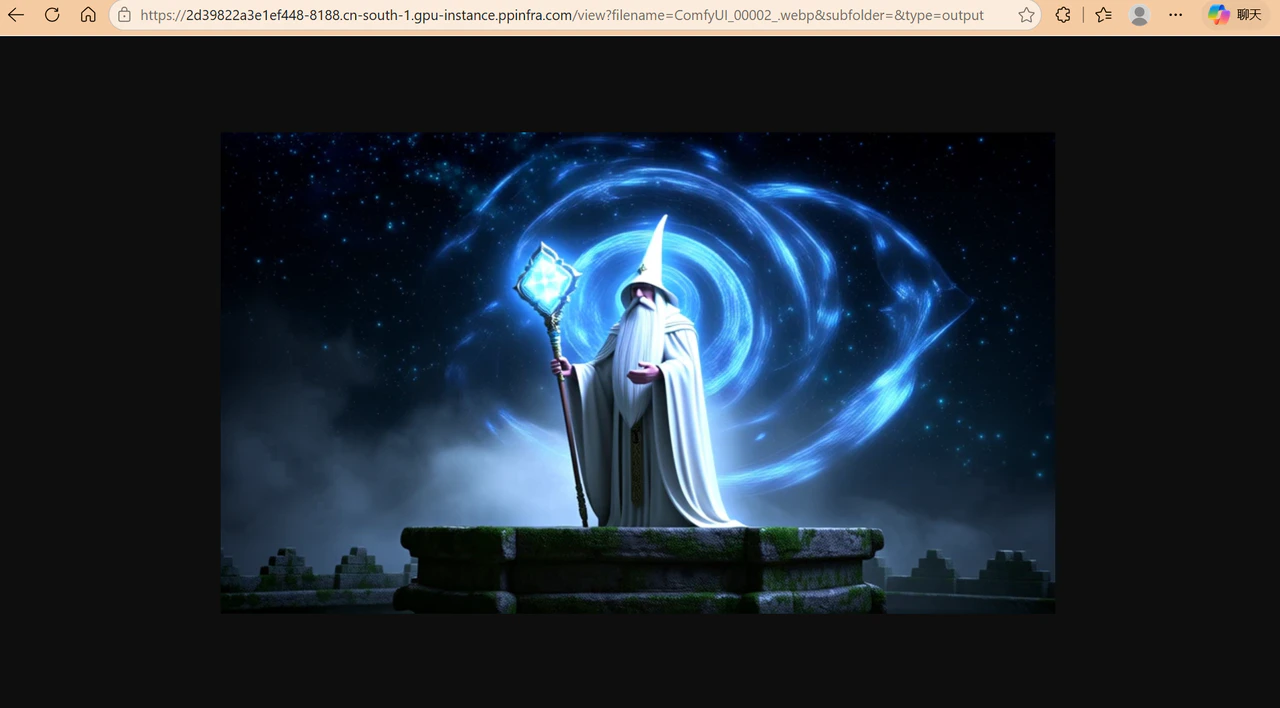
https://2d39822a3e1ef448-8188.cn-south-1.gpu-instance.ppinfra.com/view?filename=ComfyUI_00002_.webp&subfolder=&type=output
```