

Qwen-Image 文生图
curl --request POST \
  --url https://api.ppio.com/v3/async/qwen-image-txt2img \
  --header 'Authorization: <authorization>' \
  --header 'Content-Type: <content-type>' \
  --data '
{
  "prompt": "<string>",
  "size": "<string>",
  "watermark": true
}
'
import requests
url = "https://api.ppio.com/v3/async/qwen-image-txt2img"
payload = {
"prompt": "<string>",
"size": "<string>",
"watermark": True
}
headers = {
"Content-Type": "<content-type>",
"Authorization": "<authorization>"
}
response = requests.post(url, json=payload, headers=headers)
print(response.text)const options = {
method: 'POST',
headers: {'Content-Type': '<content-type>', Authorization: '<authorization>'},
body: JSON.stringify({prompt: '<string>', size: '<string>', watermark: true})
};
fetch('https://api.ppio.com/v3/async/qwen-image-txt2img', options)
.then(res => res.json())
.then(res => console.log(res))
.catch(err => console.error(err));<?php
$curl = curl_init();
curl_setopt_array($curl, [
CURLOPT_URL => "https://api.ppio.com/v3/async/qwen-image-txt2img",
CURLOPT_RETURNTRANSFER => true,
CURLOPT_ENCODING => "",
CURLOPT_MAXREDIRS => 10,
CURLOPT_TIMEOUT => 30,
CURLOPT_HTTP_VERSION => CURL_HTTP_VERSION_1_1,
CURLOPT_CUSTOMREQUEST => "POST",
CURLOPT_POSTFIELDS => json_encode([
'prompt' => '<string>',
'size' => '<string>',
'watermark' => true
]),
CURLOPT_HTTPHEADER => [
"Authorization: <authorization>",
"Content-Type: <content-type>"
],
]);
$response = curl_exec($curl);
$err = curl_error($curl);
curl_close($curl);
if ($err) {
echo "cURL Error #:" . $err;
} else {
echo $response;
}package main
import (
"fmt"
"strings"
"net/http"
"io"
)
func main() {
url := "https://api.ppio.com/v3/async/qwen-image-txt2img"
payload := strings.NewReader("{\n \"prompt\": \"<string>\",\n \"size\": \"<string>\",\n \"watermark\": true\n}")
req, _ := http.NewRequest("POST", url, payload)
req.Header.Add("Content-Type", "<content-type>")
req.Header.Add("Authorization", "<authorization>")
res, _ := http.DefaultClient.Do(req)
defer res.Body.Close()
body, _ := io.ReadAll(res.Body)
fmt.Println(string(body))
}HttpResponse<String> response = Unirest.post("https://api.ppio.com/v3/async/qwen-image-txt2img")
.header("Content-Type", "<content-type>")
.header("Authorization", "<authorization>")
.body("{\n \"prompt\": \"<string>\",\n \"size\": \"<string>\",\n \"watermark\": true\n}")
.asString();require 'uri'
require 'net/http'
url = URI("https://api.ppio.com/v3/async/qwen-image-txt2img")
http = Net::HTTP.new(url.host, url.port)
http.use_ssl = true
request = Net::HTTP::Post.new(url)
request["Content-Type"] = '<content-type>'
request["Authorization"] = '<authorization>'
request.body = "{\n \"prompt\": \"<string>\",\n \"size\": \"<string>\",\n \"watermark\": true\n}"
response = http.request(request)
puts response.read_body{
"task_id": "<string>"
}图像
Qwen-Image 文生图
POST
/
v3
/
async
/
qwen-image-txt2img
Qwen-Image 文生图
curl --request POST \
  --url https://api.ppio.com/v3/async/qwen-image-txt2img \
  --header 'Authorization: <authorization>' \
  --header 'Content-Type: <content-type>' \
  --data '
{
  "prompt": "<string>",
  "size": "<string>",
  "watermark": true
}
'
import requests
url = "https://api.ppio.com/v3/async/qwen-image-txt2img"
payload = {
"prompt": "<string>",
"size": "<string>",
"watermark": True
}
headers = {
"Content-Type": "<content-type>",
"Authorization": "<authorization>"
}
response = requests.post(url, json=payload, headers=headers)
print(response.text)const options = {
method: 'POST',
headers: {'Content-Type': '<content-type>', Authorization: '<authorization>'},
body: JSON.stringify({prompt: '<string>', size: '<string>', watermark: true})
};
fetch('https://api.ppio.com/v3/async/qwen-image-txt2img', options)
.then(res => res.json())
.then(res => console.log(res))
.catch(err => console.error(err));<?php
$curl = curl_init();
curl_setopt_array($curl, [
CURLOPT_URL => "https://api.ppio.com/v3/async/qwen-image-txt2img",
CURLOPT_RETURNTRANSFER => true,
CURLOPT_ENCODING => "",
CURLOPT_MAXREDIRS => 10,
CURLOPT_TIMEOUT => 30,
CURLOPT_HTTP_VERSION => CURL_HTTP_VERSION_1_1,
CURLOPT_CUSTOMREQUEST => "POST",
CURLOPT_POSTFIELDS => json_encode([
'prompt' => '<string>',
'size' => '<string>',
'watermark' => true
]),
CURLOPT_HTTPHEADER => [
"Authorization: <authorization>",
"Content-Type: <content-type>"
],
]);
$response = curl_exec($curl);
$err = curl_error($curl);
curl_close($curl);
if ($err) {
echo "cURL Error #:" . $err;
} else {
echo $response;
}package main
import (
"fmt"
"strings"
"net/http"
"io"
)
func main() {
url := "https://api.ppio.com/v3/async/qwen-image-txt2img"
payload := strings.NewReader("{\n \"prompt\": \"<string>\",\n \"size\": \"<string>\",\n \"watermark\": true\n}")
req, _ := http.NewRequest("POST", url, payload)
req.Header.Add("Content-Type", "<content-type>")
req.Header.Add("Authorization", "<authorization>")
res, _ := http.DefaultClient.Do(req)
defer res.Body.Close()
body, _ := io.ReadAll(res.Body)
fmt.Println(string(body))
}HttpResponse<String> response = Unirest.post("https://api.ppio.com/v3/async/qwen-image-txt2img")
.header("Content-Type", "<content-type>")
.header("Authorization", "<authorization>")
.body("{\n \"prompt\": \"<string>\",\n \"size\": \"<string>\",\n \"watermark\": true\n}")
.asString();require 'uri'
require 'net/http'
url = URI("https://api.ppio.com/v3/async/qwen-image-txt2img")
http = Net::HTTP.new(url.host, url.port)
http.use_ssl = true
request = Net::HTTP::Post.new(url)
request["Content-Type"] = '<content-type>'
request["Authorization"] = '<authorization>'
request.body = "{\n \"prompt\": \"<string>\",\n \"size\": \"<string>\",\n \"watermark\": true\n}"
response = http.request(request)
puts response.read_body{
"task_id": "<string>"
}Qwen-Image — 一个20B MMDiT模型,用于下一代文本到图像生成。特别擅长创建带有本地文本的惊艳图形海报。
这是一个异步API,只会返回异步任务的 task_id。您应该使用该 task_id 请求 查询任务结果 API 来检索生成结果。
请求头
string
必填
枚举值:
application/jsonstring
必填
Bearer 身份验证格式,例如:Bearer {{API 密钥}}。
请求体
string
必填
图像生成的文本提示。
string
生成媒体的像素大小(宽*高)。默认值为
1024*1024。长和宽的像素范围:256 ~ 1536。boolean
默认值:false
为生成的图像添加水印。
false:不添加水印。true:在图像添加文字的水印,标识由人工智能生成合成。
响应参数
string
必填
异步任务的 task_id。您应该使用该 task_id 请求 查询任务结果 API 以获取生成结果
示例
以下是如何使用 Qwen-Image 文生图 API 的示例。- 通过向 Qwen-Image 文生图 API 发送 POST 请求生成 task_id。
请求:
curl --location 'https://api.ppio.com/v3/async/qwen-image-txt2img' \
--header 'Authorization: Bearer {{API Key}}' \
--header 'Content-Type: application/json' \
--data '{
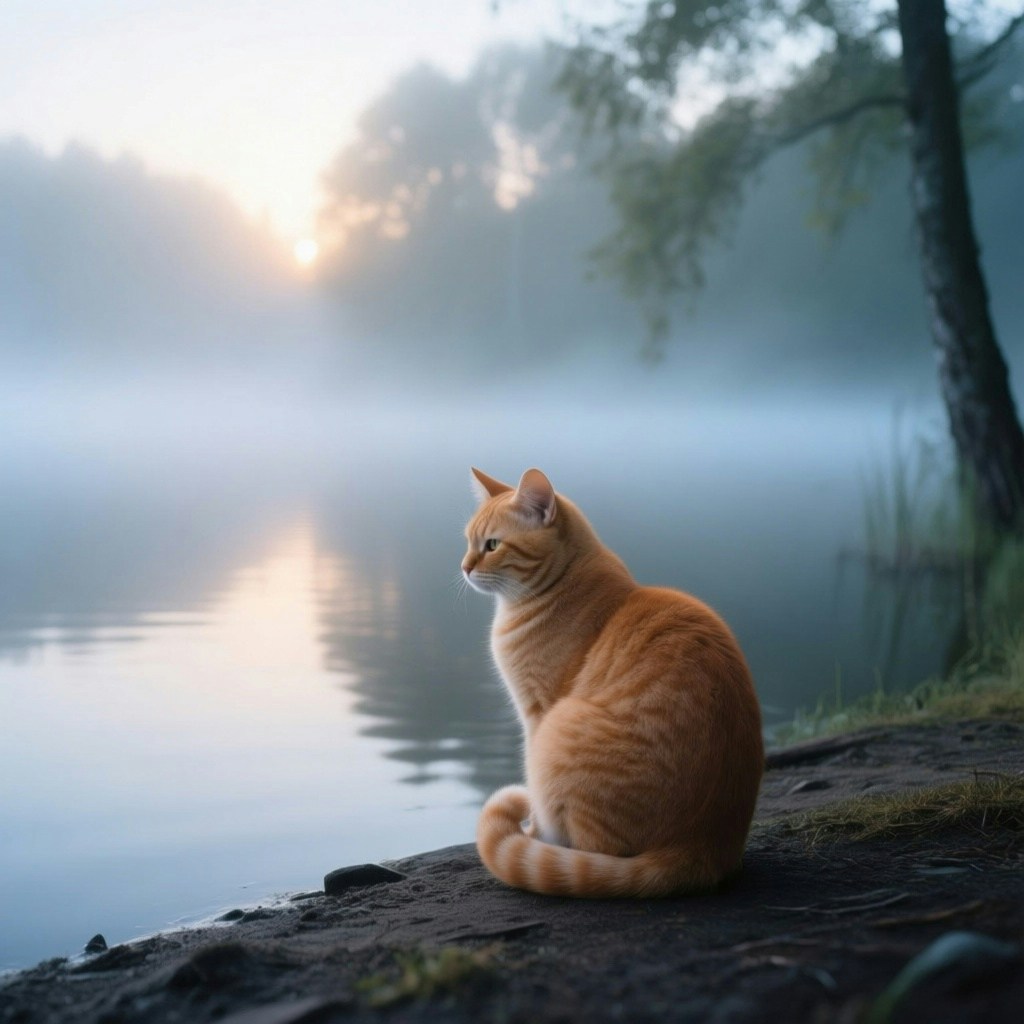
    "prompt": "一只安静的橘色短毛猫蜷坐在黎明时分薄雾缭绕的湖边。它卷着尾巴,静静地望着水面。柔和的晨光透过树影洒下,冷色调,宁静氛围,轻雾环绕,50mm摄影风格。",
    "size": "1024*1024"
}'
响应:
{
    "task_id": "{返回的任务 ID}"
}
- 使用
task_id获取输出图片。
images 中获取图片 URL。
请求:
curl --location --request GET 'https://api.ppio.com/v3/async/task-result?task_id={返回的任务 ID}' \
--header 'Authorization: Bearer {{API Key}}'
响应:
{
    "extra": {
        "has_nsfw_contents": []
    },
    "task": {
        "task_id": "679c6531-a8d1-400c-8071-d58ccf074ae5",
        "task_type": "QWEN_IMAGE_TEXT_TO_IMAGE",
        "status": "TASK_STATUS_SUCCEED",
        "reason": "",
        "eta": 0,
        "progress_percent": 0
    },
    "images": [
        {
            "image_url": "https://d2p7pge43lyniu.cloudfront.net/output/86d76970-441d-4b53-af90-4ce0ae092040-u1_2943371d-2819-4f96-8941-cbd46a8056eb.jpeg",
            "image_url_ttl": "0",
            "image_type": "jpeg",
            "nsfw_detection_result": null
        }
    ],
    "videos": [],
    "audios": []
}
图片文件:
最后修改于 2026年1月14日